
SEO Best Practices for Web Designers: Building Search-Engine Friendly Websites
This comprehensive guide from Layout Scene is engineered to empower web designers with the knowledge and actionable strategies required to build websites that are not only aesthetically pleasing and functional but also highly discoverable by search engines. We’ll delve into the practical steps and underlying principles that transform a mere website into a powerful online asset, ensuring your creations reach the audiences they deserve. By integrating SEO best practices from the ground up, you’ll craft digital experiences that rank higher, attract more organic traffic, and deliver measurable results for your clients and your own portfolio.
The Essential Convergence: Why SEO for Web Designers is Non-Negotiable
The traditional divide between “designers” and “SEO specialists” is rapidly diminishing. In today’s competitive digital landscape, a web designer’s role extends far beyond aesthetics. Google’s algorithms increasingly prioritize user experience, site performance, and structural integrity – all elements that fall squarely within a designer’s purview. Understanding SEO for web designers isn’t just about appeasing search engines; it’s about creating superior, more effective websites.
Consider this: a website that loads slowly, is difficult to navigate, or isn’t accessible on mobile devices will perform poorly in search rankings, regardless of its visual appeal. Google’s own data indicates that the probability of bounce increases by 32% as page load time goes from 1 second to 3 seconds. These performance metrics, directly influenced by design and development choices, are critical ranking factors. Furthermore, search engines like Google use sophisticated crawlers to “read” and understand a website’s content and structure. If your site’s code is convoluted, its navigation is illogical, or its images aren’t optimized, these crawlers struggle to index it effectively, leading to lower visibility.
By integrating SEO thinking into every stage of the design process – from wireframing to final deployment – web designers can significantly enhance a site’s discoverability. This proactive approach saves time and money in the long run, avoiding costly reworks and ensuring that the website is built for success from day one. It transforms your role from merely a creator of visuals to a strategic partner in online business growth, adding immense value to your services and setting your work apart in the marketplace.
Practical Steps:
- Educate Yourself: Stay updated with Google’s algorithm changes and SEO best practices relevant to front-end development.
- Collaborate Early: Engage with SEO specialists or content strategists from the initial project planning phase, not just at launch.
- Champion SEO Internally: Advocate for SEO considerations within your design team and with clients, explaining the long-term benefits.
Crafting SEO-Friendly Foundations: Semantic HTML & Site Structure
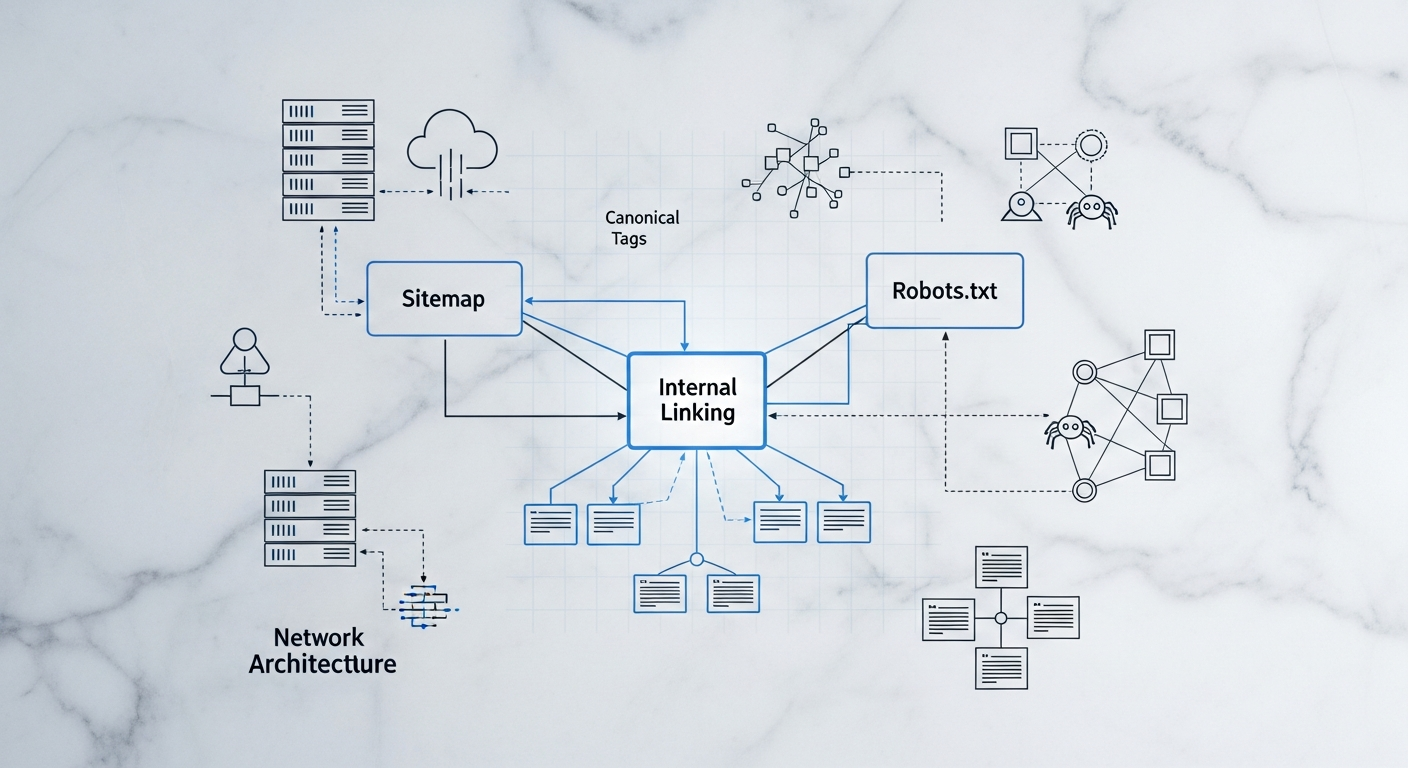
The very backbone of any website is its HTML, and how it’s structured profoundly impacts SEO. Search engines don’t just see pixels; they read code. Semantic HTML, using elements like `<header>`, `<nav>`, `<main>`, `<article>`, `<section>`, `<aside>`, and `<footer>` correctly, provides context and meaning to your content. This helps crawlers understand the hierarchy and relevance of different parts of a page, making it easier for them to index and rank your content accurately.
Think of semantic HTML as giving your website a clear table of contents that search engines can easily parse. Instead of using generic `<div>` tags for everything, which offers no inherent meaning, semantic tags clearly delineate content areas. For instance, an `<article>` tag tells a search engine, “this is a self-contained piece of content that could be distributed independently,” which is much more informative than a plain `<div>` with a class name like “blog-post.” This clarity can contribute to better indexing and potentially improved snippet generation in search results.
Beyond individual page structure, the overall site architecture is equally vital. A logical, hierarchical structure, typically represented as a clear navigation tree, helps both users and search engines find content efficiently. A shallow site structure, where important pages are only a few clicks from the homepage, generally performs better. Deep, convoluted structures can make it difficult for crawlers to discover all pages, leading to “orphan pages” that receive less attention.
Practical Steps:
- Prioritize Semantic HTML5: Always use appropriate semantic tags (`<header>`, `<nav>`, `<main>`, `<article>`, `<section>`, `<aside>`, `<footer>`) to structure your page content.
- Logical Site Hierarchy: Design a clear and intuitive site architecture where related content is grouped logically and important pages are easily accessible from the homepage (ideally within 3-4 clicks).
- Breadcrumbs Navigation: Implement breadcrumbs (`<nav aria-label=”breadcrumb”>…</nav>`) for larger sites to enhance user navigation and provide clear paths for search engines.
- Clean URLs: Design user-friendly and keyword-rich URLs (e.g., `yoursite.com/category/product-name` instead of `yoursite.com/?p=123&cat=4`).
On-Page Optimization: Embedding SEO into Every Element
On-page SEO refers to optimizing individual web pages to rank higher and earn more relevant traffic in search engines. While content is king, the way that content is presented and framed through various HTML elements significantly impacts its discoverability. Web designers have a direct hand in many of these critical elements, making this a cornerstone of effective SEO for web designers.
Key areas include title tags, meta descriptions, header tags (H1-H6), image optimization, and internal linking. The `<title>` tag is perhaps the most crucial on-page element, serving as the headline for your page in search results. It should be unique, concise (ideally under 60 characters), and include your target keyword. The meta description, while not a direct ranking factor, acts as an advertisement for your page, influencing click-through rates. A compelling meta description, around 150-160 characters, should accurately summarize the page’s content and include a call to action.
Header tags (`<h1>` through `<h6>`) establish a clear content hierarchy on the page. The `<h1>` should be reserved for the main topic of the page, ideally containing the primary keyword, and there should only be one `<h1>` per page. Subsequent `<h2>`, `<h3>`, etc., should break down the content into logical subsections, making it easier for both users and search engines to digest. Image optimization is another vital aspect. Large, unoptimized images can significantly slow down page load times. Compressing images, using appropriate file formats (e.g., WebP, JPG, PNG), and implementing descriptive `alt` attributes not only improves performance but also enhances accessibility and helps search engines understand image content.
Practical Steps:
- Optimize Title Tags: Ensure each page has a unique, descriptive, keyword-rich title tag (aim for 50-60 characters).
- Craft Engaging Meta Descriptions: Write concise, compelling meta descriptions (150-160 characters) that encourage clicks and include relevant keywords.
- Implement Header Hierarchy: Use `<h1>` for the main page title (only one per page), and `<h2>` through `<h6>` to structure content logically.
- Image Optimization:
- Compress images before uploading (tools like TinyPNG, ImageOptim).
- Use responsive image techniques (`<picture>` element, `srcset` attribute).
- Write descriptive `alt` text for all images, incorporating keywords where natural and relevant for accessibility.
- Lazy load images below the fold to improve initial page load speed.
- Strategic Internal Linking: Create a logical internal linking structure using descriptive anchor text, connecting related content within the site to distribute “link equity” and aid navigation.
Mastering Technical SEO: Ensuring Crawlability and Indexability
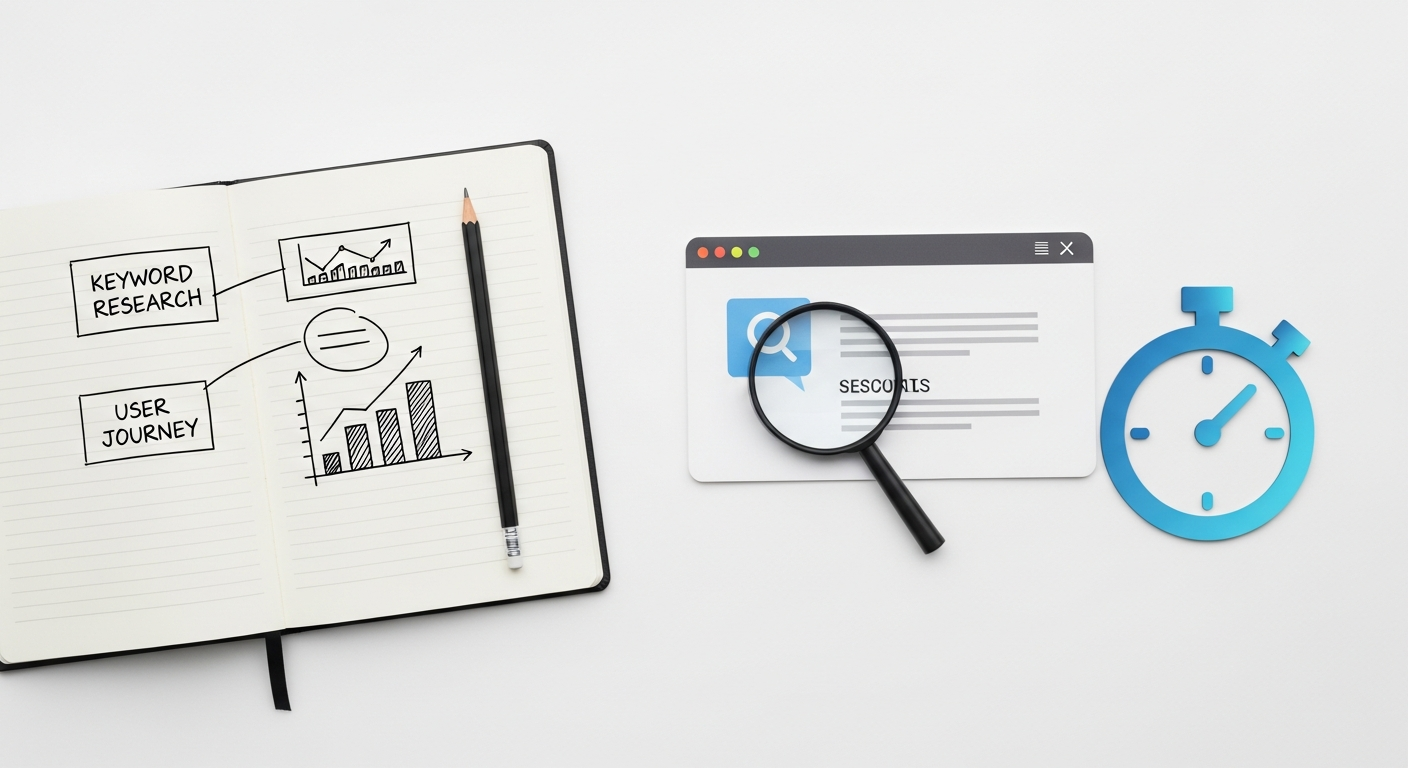
Technical SEO refers to website and server optimizations that help search engine spiders crawl and index your site more effectively. While some aspects might lean towards development, designers are instrumental in ensuring the fundamental technical integrity of a site. A beautiful website is useless if search engines can’t find, read, or understand it. For web designers, this means understanding the role of elements like sitemaps, robots.txt, canonical tags, and SSL certificates.
Sitemaps: An XML sitemap (`sitemap.xml`) is essentially a roadmap for search engines, listing all the important pages on your website. It helps crawlers discover all your content, especially on large sites or those with complex structures. As a designer, ensuring that your CMS or site builder automatically generates and updates a sitemap, and that all relevant pages are included, is crucial. For example, dynamically generated product pages on an e-commerce site must be included to ensure they are indexed.
Robots.txt: This file (`robots.txt`) tells search engine crawlers which parts of your website they are allowed or not allowed to access. It’s a powerful tool for preventing the indexing of duplicate content, private areas, or development pages. However, misconfigurations can inadvertently block critical parts of your site, leading to de-indexing. Designers should be aware of its existence and ensure it’s configured correctly, especially during staging and deployment.
Canonicalization: Duplicate content can confuse search engines, potentially splitting “link equity” between multiple URLs and diluting their ranking power. Canonical tags (`<link rel=”canonical” href=”…”>`) are placed in the `<head>` of a page to tell search engines which version of a URL is the preferred, authoritative one. This is common for pages accessible via multiple URLs (e.g., with and without trailing slashes, or tracking parameters). As a designer, you might encounter this when designing templates or URL structures.
SSL Certificates (HTTPS): Security is a top priority for Google, and HTTPS (Hypertext Transfer Protocol Secure) is a confirmed ranking factor. Implementing an SSL certificate ensures that data exchanged between the user’s browser and the website is encrypted. All modern websites should be served over HTTPS. Designers should always factor SSL implementation into their deployment checklist, even if the final configuration is handled by a developer or hosting provider.
Practical Steps:
- XML Sitemap Configuration: Ensure an accurate `sitemap.xml` exists and is submitted to search engines via Google Search Console and Bing Webmaster Tools.
- Robots.txt Management: Understand and correctly configure `robots.txt` to guide crawler access, blocking only non-essential or private areas.
- Implement Canonical Tags: Use `rel=”canonical”` tags to prevent duplicate content issues, especially for pages with slight variations or accessible via multiple URLs.
- Secure Websites with HTTPS: Always build and deploy sites with an SSL certificate, ensuring all content is served over HTTPS. Redirect HTTP to HTTPS correctly.
- Handle Broken Links: Regularly check for and fix 404 errors. Design custom, helpful 404 pages that guide users back to relevant content.
Performance, User Experience & Core Web Vitals: The Speed & Accessibility Advantage
Google has made it unequivocally clear: page experience is a critical ranking factor. This encompasses Core Web Vitals (CWV) – a set of metrics related to speed, responsiveness, and visual stability – along with mobile-friendliness, safe-browsing, HTTPS, and intrusive interstitial guidelines. For web designers, optimizing for these factors isn’t just good practice; it’s essential for SEO success.
Core Web Vitals:
- Largest Contentful Paint (LCP): Measures loading performance. It’s the time it takes for the largest content element on the screen to become visible. Designers impact this through efficient image loading, minimal render-blocking resources, and optimized asset delivery. Target: < 2.5 seconds.
- First Input Delay (FID): Measures interactivity. It’s the time from when a user first interacts with a page (e.g., clicks a button) to when the browser is actually able to respond to that interaction. Designers influence this by minimizing JavaScript execution time and ensuring the main thread isn’t blocked. Target: < 100 milliseconds.
- Cumulative Layout Shift (CLS): Measures visual stability. It quantifies unexpected layout shifts of visual page content. Designers can prevent CLS by properly sizing images and video elements, avoiding dynamic content injection above existing content, and ensuring web fonts load without causing “flash of unstyled text” (FOUT) or “flash of invisible text” (FOIT). Target: < 0.1.
Beyond CWV, overall site speed and responsiveness are crucial. A fast website provides a better user experience, reduces bounce rates, and encourages deeper engagement. Mobile-friendliness is no longer optional; with mobile-first indexing, Google primarily uses the mobile version of your content for indexing and ranking. Designing responsive websites that adapt seamlessly to various screen sizes ensures a consistent and positive experience for all users.
Practical Steps:
- Optimize for Core Web Vitals:
- LCP: Compress images, use modern image formats (WebP), implement server-side rendering (SSR) or pre-rendering, lazy-load images and videos.
- FID: Minimize JavaScript execution, defer non-critical JS, use web workers for complex tasks.
- CLS: Specify dimensions for images and video elements, avoid injecting content above existing content, pre-load web fonts or use `font-display: swap;`.
- Prioritize Mobile-First Design: Always design with mobile users in mind, ensuring responsive layouts, legible text sizes, and easily tappable targets.
- Minimize CSS/JS: Minify CSS and JavaScript files to reduce their size and improve load times.
- Leverage Browser Caching: Configure server-side caching and browser caching to store static assets, speeding up return visits.
- Accessibility: Design with WCAG guidelines in mind. Use proper contrast ratios, clear focus states for keyboard navigation, and ARIA attributes when necessary, as accessibility is strongly correlated with good UX and therefore SEO.
Structured Data & Schema Markup: Empowering Search Engines to Understand
While semantic HTML gives search engines basic context, structured data (often implemented using Schema.org vocabulary in JSON-LD format) takes it a step further. It provides explicit meanings to pieces of information on your webpage, allowing search engines to understand your content more deeply and, in turn, display it in richer, more engaging ways in search results – known as “rich snippets” or “rich results.”
For web designers, understanding structured data isn’t about writing the content, but about ensuring the design and underlying code can accommodate and correctly implement this vital SEO element. If you’re designing a product page, for instance, you can use `Product` schema to specify the product name, price, availability, and customer reviews. For a blog post, `Article` schema can highlight the author, publication date, and headline. These elements aren’t just invisible code; they often influence how your site appears in SERPs.
Rich snippets can significantly improve click-through rates (CTR) by making your listing stand out. A star rating under a product, a recipe’s cooking time, or an event’s date and location makes your search result more informative and enticing. While schema markup isn’t a direct ranking factor, the increased CTR it often brings can indirectly boost rankings by signaling to Google that your page is highly relevant and valuable to users. Google’s rich results guide explicitly covers various types of structured data that designers and developers should be familiar with.
Practical Steps:
- Identify Applicable Schema: Understand the types of content on the site (e.g., articles, products, local businesses, recipes, events, FAQs) and identify relevant Schema.org markup.
- Integrate JSON-LD: Recommend and facilitate the implementation of JSON-LD for structured data. This typically involves adding a `