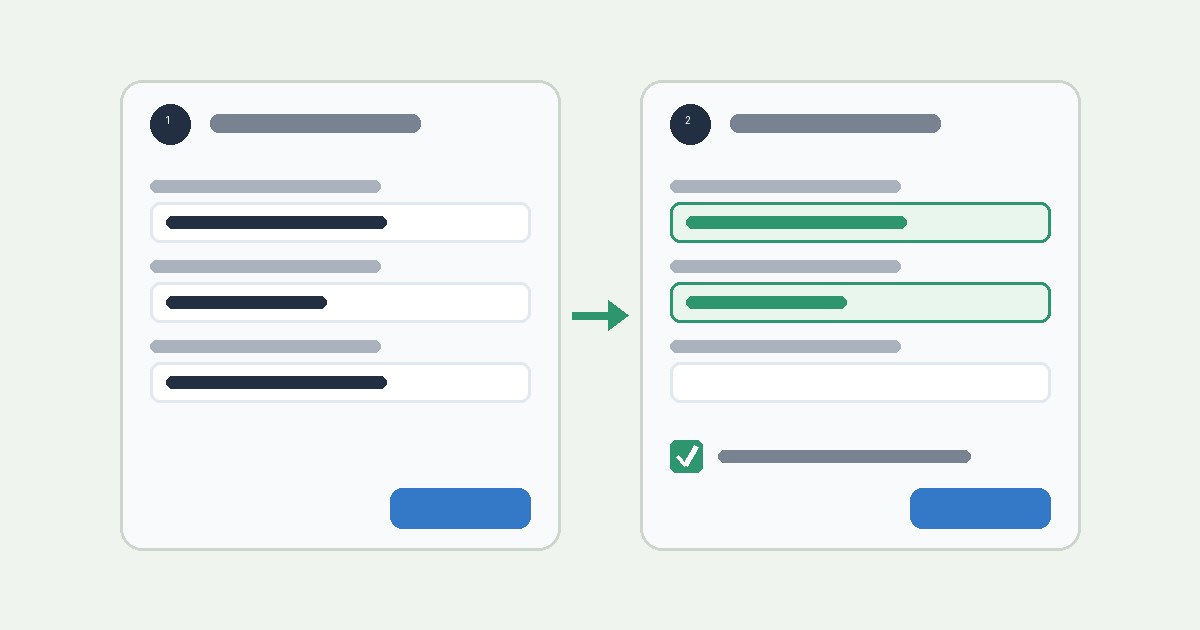
Multi-step forms often ask for the same thing twice. A checkout might ask for an address on step one and the same address again on step three. Each repeat adds effort and gives users another chance to make a mistake. WCAG 2.2 added Success Criterion 3.3.7, Redundant Entry, at Level A to address this. This guide explains the requirement, its scope and exceptions, and the form patterns that meet it. It is general information for designers and developers, not an accessibility audit or legal advice.
The requirement
The criterion reads: "Information previously entered by or provided to the user that is required to be entered again in the same process is either: auto-populated, or available for the user to select."
It has three exceptions:
- re-entering the information is essential,
- the information is required to ensure the security of the content, or
- previously entered information is no longer valid.
The W3C summary is: do not ask for the same information twice in the same activity.
Why it matters
The Understanding document explains that remembering information for input can be a significant barrier for users with cognitive or memory difficulties. All users get mentally tired as they move through a process, and recalling earlier answers speeds that up. Asking people to recall what they entered before can lead them to give up or re-enter it incorrectly.
W3C also lists a benefit for users with mobility impairments. People who use switch control or voice input have less text to enter when information is reused.
Scope: one process, one session
The Understanding document limits the scope in a few ways:
- One process. A process is defined by an activity. The criterion does not require storing information between sessions, and it does not apply when a user comes back after closing a session or navigating away.
- It can cross domains. If a checkout includes a third-party payment provider, that step is part of the same process and is in scope.
- Browser autocomplete is not enough. W3C states that the browser's autocomplete feature does not count, because the website itself must provide the stored information or avoid asking again.
- Different input methods are excluded. The criterion does not apply when the user provides data another way, such as uploading a resume as a document.
What "available to select" can mean
W3C says the term "available to select" is not prescriptive. It can include letting the user:
- select and fill a field, for example from a drop-down,
- select text on the page and copy it into an input, or
- tick a checkbox to fill inputs with values entered earlier, such as "my billing address is the same as my shipping address".
The data to select needs to be on the same page. W3C says it ideally should be visible by default and placed close to the input that needs it, but it can be elsewhere on the page, including inside a show/hide component.
Examples from W3C
The Understanding document describes several patterns that meet the criterion:
- A purchasing form asks for the user's corporate ID on step one. On step three, when the user confirms who the computer is for, the form shows the ID again. The user can change it, but it defaults to the earlier value.
- An e-commerce form lets the user confirm that the billing and delivery addresses are the same.
- A user submits a checkout form with an incorrect credit card number. The page shows an error, and the submitted information is not cleared from the form.
The third example deserves attention: clearing a form after a validation error makes the user enter everything again.
The exceptions in practice
W3C gives examples for each exception:
- Essential. Memory games, where supplying earlier answers would defeat the purpose.
- Security. Preventing a password string from being shown or copied. When a user creates a password that is not displayed, asking them to type it again to confirm is allowed.
- No longer valid. When earlier information is no longer valid, the form can ask for it again.
These exceptions apply to specific fields with a specific reason. They are not a general excuse to ask for everything twice.
W3C also notes that 3.3.7 does not prevent use of a sufficient technique for Accessible Authentication (Minimum), where letting the browser auto-fill passwords is a sufficient technique. In the security exception, a newly created password that is not displayed can still be asked for again so the user can confirm it.
Privacy
The criterion has no requirements or exceptions specific to privacy or personally identifiable information. W3C still advises authors to protect data when they store it, even temporarily during a process, and warns that a poor implementation could leak personal information. Do not show a stored sensitive value just because the user reached a later step. Reuse controls should have clear labels and states.
A review workflow
- Map the process. List each step and every piece of information collected, including data entered in dialogs and conditional branches.
- Find repeats. Mark where the same information is asked for again. A delivery address and a separate delivery note are not the same thing.
- Choose a reuse pattern. Use auto-population, a selector, or a "same as" checkbox. Let the user edit reused values.
- Apply exceptions narrowly. For each field that is still asked again, write down which exception applies and why.
- Test the full flow. Include a path with a validation error and a path where an earlier answer changes. Check keyboard operation, focus order, and mobile layout. Confirm that reused values are exposed through each control's accessible name and value.
- Record the results. Note the step, field, expected behavior, observed behavior, and criterion.
Limits of this guide
WCAG requirements depend on version, conformance level, and context. Read the normative W3C Recommendation together with the Understanding document (which is informative) before making a release decision. This article is general information, not an audit or legal opinion.
Sources
- W3C, Web Content Accessibility Guidelines (WCAG) 2.2, Success Criterion 3.3.7 Redundant Entry: https://www.w3.org/TR/WCAG22/#redundant-entry
- W3C WAI, Understanding Success Criterion 3.3.7: Redundant Entry (intent, scope, "available to select", examples, exceptions, privacy note): https://www.w3.org/WAI/WCAG22/Understanding/redundant-entry.html